Cursed story #1: CRLF
Pavlo Myroniuk August 06, 2026 #cursed-story #dataansCRLF and failed migration
We all know about the different line endings (Difference between CR LF, LF and CR line break types). Usually, I have no problems with them. I just commit files as they are and do not care.
Surprisingly, I still managed to face a problem with it.
Despite all the repro-gress in 2026, you still need to know and care about line endings.
If you follow me, you know that I built my own note-taking app for myself and have been using it for a few years now. It is called Dataans.
Today I got a new Linux machine and decided to build and run Dataans on it.
I cloned the repo, built the app, and ran it...
Oh, wait. It did not run. The app paniced with the following message:
thread 'main' (33909647) panicked at dataans/src-tauri/src/dataans/mod.rs:66:43:
Failed to run migrations: VersionMismatch(20241210221629)
What? VersionMismatch?
I did not change any files! I just cloned the repo! 😠
Actually, I did one thing before cloning and did not tell you about it 😝. The Dataans app uses SQLite as a database. Instead of starting from the empty database and syncing all data in the app, I copied the db file from the Windows machine. Why did I copy it? Because I have a bug in the sync mechanism which I have not fixed yet 🙃. My plan was to copy the db file and continue using the app as usual. It sounds horrible, but today it is okay enough 🙂.
So, why did the migration command fail?
Apparently, it is because of the checksum mismatch.
sqlx calculates the migration file checksum and compares it with the checksum in the migration table inside the DB.
In my case, these checksums were different and sqlx reported an error.
Now let's talk about line endings.
As you know, Windows uses CRLF line endings.
Migration files on Windows also have CRLF line endings.
When Dataans runs migrations on Windows, the sqlx calculates the migration files' hashes and writes them into the migrations table.
Then I switched to Linux, where migration files have LF line endings.
So, a new calculated checksum by sqlx is different from the one written in the db.
Voila, migration error 💥.
Did you notice anything suspicious?
In both cases, I made no modifications and got different checksums.
It is because git performs automatic file conversion when you clone the repo, add files to the index, pull changes, do a checkout, etc.
Wait, wait, wait! Hold on. Is it a default behavior?
This git behavior can be configured: core.autocrlf.
The default value for core.autocrlf is false, and I am 100% sure I did not change it to true.
Why does git do automatic line-ending conversion?
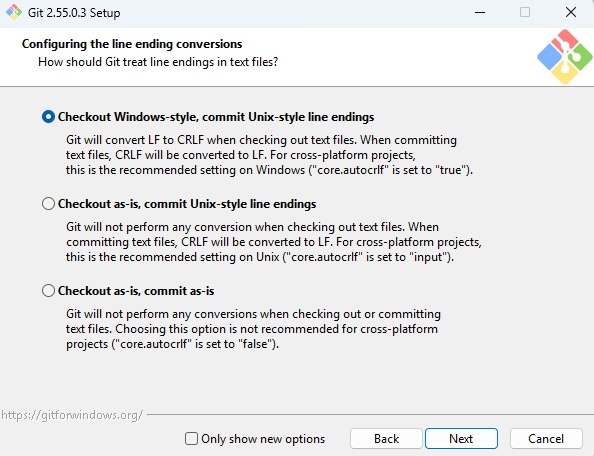
Because when I was installing git on the Windows machine, the installer asked me how to deal with line endings.
I, and probably you, do not care to read that and just click "Next":
Summary
I got the checksum mismatch error because the migration file hash on Windows and Linux is different.
The hash is different because on Windows all files in the repo are automatically converted by git to have CRLF endings.
git automatically converts line endings because I told it to do so during git installation and totally forgot about it.
To resolve the issue I converted migration files on Linux to have CRLF ending and the app started successfully.
Conclusions
- Read installation options carefully and remember what you clicked.
- Running SQLite migrations on OSs with different line endings using the same DB file is a bad idea.
- If you clone the repo, the file hash can be different in different environments.